


Moescape - Character AI & Art
4.4570.00 Reviews
App Specs
- Version
- 1.23.0
- Updated On
- License
- Free
- Downloads
- 500,000+
- Developer
- Moescape
- Categories
- Entertainment
- Platform
- Android
Screenshots
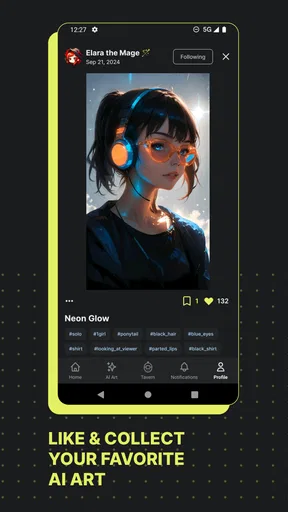
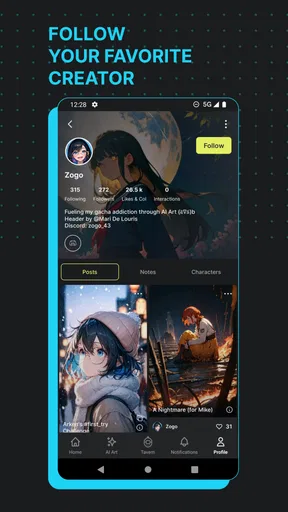
 Analysis by AppCompare
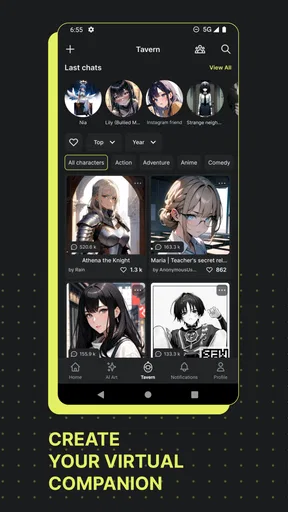
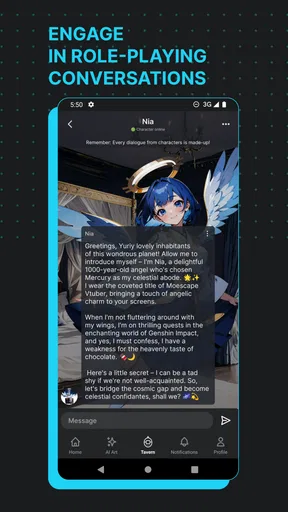
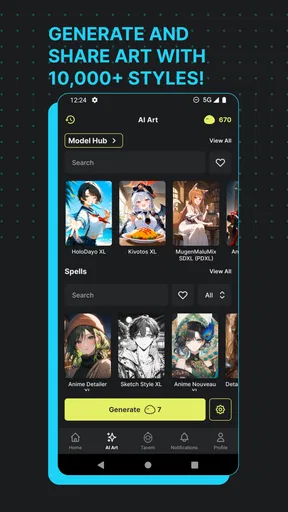
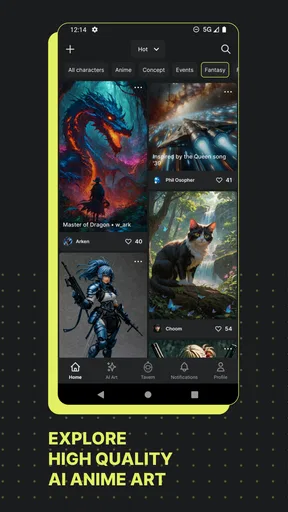
I opened Moescape expecting an entertainment app built around anime-style artificial intelligence, and that is exactly where it makes the strongest first impression. Developed by Moescape, it combines character conversations with creative image and video tools, so it feels less like a single-purpose chatbot and more like a small playground for roleplay and visual experimentation. I found the appeal easy to understand: you can begin with a character idea, continue through a conversation, and then turn that creative direction into something visual.
The app is free to start, carries a Teen content rating, and runs on Android 10 or later. Its current version is 1.23.0, while the Android listing shows a 4.4 average from around 9,500 ratings and more than 500,000 installs. Those figures suggest that it has already found an audience beyond the novelty stage, although popularity does not remove the need to decide whether its style suits you.
From a vague idea to an anime roleplay session
My most useful way to approach this app is not to treat it as a replacement for a conventional messaging service. I see it as a guided creative session. The starting condition can be very simple: perhaps I want to test a character personality, explore a fictional situation, or develop a visual concept without opening a separate writing and art workflow.
That starting point matters because the app’s two sides support different moods. The conversational side is better when I want an immediate response and a sense of interaction. The image and video side is more suitable when I already have a scene, appearance, or atmosphere in mind. Moving between them gives the experience more purpose than endlessly sending messages to a character with no creative destination.
I would recommend beginning with a narrow intention. Instead of asking a character to be “interesting,” I would decide whether I want a dramatic exchange, a light roleplay, a character-development exercise, or a visual prompt. This makes the first session easier to judge. If I start without any direction, the novelty can carry me for a while, but the conversation may feel less satisfying once the initial surprise fades.
Choosing the right kind of interaction
The roleplay element is the best fit for people who enjoy anime-inspired personalities and fictional scenarios. It can provide a more playful experience than a standard assistant because the point is not always to obtain a correct answer. Sometimes the value is in seeing how a character reacts, testing a premise, or using dialogue to discover what kind of story I actually want to create.
That also means expectations need to be realistic. I would not use this app for dependable research, serious advice, or conversations where factual precision is essential. A character-focused AI can be entertaining precisely because it follows a fictional tone, but that same quality makes it a poor substitute for a trusted information source. The app works best when I remain aware that I am directing an imaginative exchange rather than consulting an expert.
Worth Reading Before You Choose

EA SPORTS FC Mobile 26 Is a Bigger Football Game, but It Takes Time

Flipboard Shows What News Apps Must Do Beyond the Feed

Switching to Android Auto Means Rethinking Your Driving Routine

Google Calendar Makes a Crowded Week Easier to Manage

Ludo King Makes the Most of the Minutes Between Plans

Baby Panda World Brings Quick Play to Modern Phones, but Its Game Library Feels Busy
A practical technique is to establish the scene before asking for a response. I can define the relationship between characters, the emotional temperature, and the immediate problem. Even a short setup gives the conversation a clearer handoff from my idea to the generated reply. If the exchange starts drifting, I can restate the scene instead of repeatedly correcting individual sentences.
Turning conversation into a visual brief
The most interesting workflow is the handoff from roleplay to visual creation. I might begin with a character discussing a location or reacting to an event, then use the resulting details as a visual brief. This is more useful than treating the image or video tools as a completely separate feature, because the conversation can help me uncover details I had not considered: clothing, lighting, mood, setting, or the character’s expression.
I would still edit that brief before using it. Conversational text often contains atmosphere and dialogue that are valuable for storytelling but too vague for a visual result. Pulling out the concrete elements first creates a cleaner transition. I would keep the subject, action, environment, color mood, and camera-like emphasis together, while removing lines that only make sense inside the conversation.
This is one of the app’s less obvious strengths: it can function as a bridge between brainstorming and making. Someone who struggles to begin with a blank image prompt may find it easier to talk through a scene first. The trade-off is that the handoff is not completely automatic in the way a dedicated creative pipeline might be. I still need to decide which parts of the roleplay should survive into the visual request.
What to expect from the image and video side
The visual tools make the app more appealing than a character-chat application that ends with text. They give a scene somewhere to go, whether the result is intended as a personal experiment, a reference for a story, or simply a piece of anime-style entertainment. I especially like the idea of using the same fictional concept in two forms: first as a conversation, then as a visual interpretation.
However, I would judge the visual result as an interpretation rather than a guaranteed continuation of the exact character I imagined. AI-generated media can change details between attempts, and a description that sounds clear to a person may still be open to multiple visual readings. That is not necessarily a flaw for casual experimentation, but it becomes frustrating if I need strict consistency across a sequence.
For that reason, I would save the core description of a character separately in my own notes. A compact reference containing appearance, personality, setting, and recurring details makes it easier to restart a scene or refine a request. This is a simple workflow improvement, but it prevents the app from becoming the only place where the creative idea exists.
Following the handoffs without losing the thread
The complete path I found most useful is: choose a character or roleplay direction, establish a scene, let the conversation develop, extract the strongest details, and then use those details for an image or video attempt. Each step has a different job. The conversation supplies motion and personality; the visual request supplies focus; the final result shows whether the original idea survived the transition.
I would not rush through the middle step. The temptation is to generate something immediately, but a few turns of purposeful dialogue can reveal whether the premise is actually interesting. If the character’s responses feel repetitive, the visual result may not solve the underlying problem. Changing the setting, adding a conflict, or giving the character a specific goal is more effective than simply asking for longer replies.
There is also a useful distinction between a private creative session and a finished piece. For a quick experiment, I can accept inconsistency and enjoy whatever direction the app takes. For something I want to keep, I need a more deliberate handoff: stable character notes, a clearly described scene, and a willingness to revise. The app supports the first use case naturally; the second requires more work from me.
Where the free entry point stops being simple
The free price makes trying the experience straightforward, but the presence of in-app purchases changes how I would plan regular use. Purchases are listed from $4.99 to $359.99 per item, which is a very wide range. I would therefore avoid treating the app as an unlimited creative tool before checking how my intended usage interacts with its paid options inside the app.
This is particularly important for image and video experimentation, because repeated generation can become a habit. I would begin with a small, clearly defined project rather than producing many variations without a goal. That approach helps me judge the quality and usefulness of the workflow before spending anything. It also keeps the entertainment value from turning into an unplanned recurring expense.
Parents and younger users should pay attention to the Teen rating. The app’s fictional conversations and generated media are not the same as a children’s drawing toy, so I would not hand it to a child without considering whether the roleplay themes and creative interactions are appropriate. The rating is a practical signal to treat the app as teen-oriented entertainment rather than a universally suitable family app.
A realistic everyday scenario
Imagine I have a spare half hour after work and want to develop a visual idea for a short anime-inspired story. I could start by describing a tired courier arriving at a neon-lit station during a storm. Instead of asking immediately for an image, I would use the roleplay to explore what the courier wants, whom they are meeting, and why the delivery matters.
After a few exchanges, I would pull out the details that give the scene identity: the wet station, the courier’s worn clothing, the unusual package, and the nervous mood. I would then reshape those details into a concise visual request. The outcome might not be final artwork, but it could give me a useful direction that would have been harder to invent from an empty prompt field.
If the result misses the mood, I would change one element at a time rather than rewriting everything. First I might strengthen the lighting, then clarify the pose, then simplify the background. This makes the process easier to understand and helps me learn whether the problem comes from my description or from the app’s interpretation. That incremental approach is more productive than generating random alternatives.
How it compares with familiar alternatives
Compared with a standard chatbot, this app is more focused on fictional identity and anime-oriented entertainment. A general assistant is usually the better choice for planning, factual questions, editing practical documents, or maintaining a neutral tone. I would choose Moescape when I want the conversation itself to feel like part of a fictional world.
Compared with a dedicated image generator, it offers a more conversational route into visual creation. A specialist art app may provide a deeper set of controls or a more disciplined production workflow, while this app’s advantage is the connection between character interaction and media generation. If my priority is precise art direction, I would lean toward the specialist. If my priority is discovering an idea through roleplay, this app is more inviting.
It also differs from ordinary entertainment apps because the user supplies much of the direction. There is no passive stream to consume; the experience depends on what I ask, refine, and carry forward. That can feel rewarding when I have a clear premise, but less engaging when I want something that works without effort. In that situation, a conventional game, video service, or curated story app may be a better fit.
The friction points I noticed
The biggest weakness is the distance between a fun first exchange and a consistently useful creative workflow. A character can be engaging for several turns, yet the conversation may still need active steering. I have to notice when the scene loses its purpose and provide a stronger goal, conflict, or constraint.
The second friction point is continuity across formats. A roleplay can contain rich emotional context, but a visual request needs concrete, organized information. If I transfer the conversation word for word, I risk getting a muddled result. The app is most effective when I act as the editor between its modes rather than expecting one mode to perfectly translate into the other.
The third is cost awareness. Free access is useful for testing the concept, but the listed purchase range means heavy experimentation deserves a budget limit. I would also be cautious about using it as a daily emotional substitute. Fictional companionship can be enjoyable, but it should complement real relationships and activities, not quietly replace them.
Who should try it, and who should skip it
I think the app is a strong match for anime fans, roleplay writers, character designers, and curious users who want to turn a conversation into an image or video idea. It is especially suitable for someone who often has half-formed concepts and wants an interactive way to develop them. The ability to move from dialogue to visual experimentation gives the app a clear identity in the entertainment category.
I would skip it if I mainly need accurate answers, professional-grade production controls, or a predictable art workflow. I would also look elsewhere if I dislike fictional chat, prefer entirely human-created content, or do not want to monitor optional spending. The app asks for participation and imagination; it is not designed to be a silent, frictionless utility.
After using it as a complete input-to-outcome workflow, my view is positive but measured. The best result comes when I treat the app as a creative partner for anime roleplay and visual exploration, not as an authority or a finished-content machine. Start with one scene, guide the character deliberately, edit the handoff into a visual brief, and judge the result before committing to purchases.
For that kind of session, the real strength is the connection between imagination, conversation, and generated media. Moescape gives those stages a shared space, and that makes it more distinctive than a basic character chat. It is worth trying for the right audience, provided you are comfortable steering the experience, keeping expectations realistic, and remembering that the most valuable part of the result may be the idea you develop along the way rather than a perfect final generation.
Pros
- Offers creative roleplay with a wide range of AI character personalities.
- Image generation adds visual depth to chats and original storytelling.
- Character creation tools allow users to customize their own scenarios.
- Community-made characters provide plenty of content to explore.
- Useful for brainstorming stories
- dialogue
- and fictional world ideas.
Cons
- AI responses can occasionally be repetitive
- inconsistent
- or out of character.
- Some advanced features or generation limits may require paid credits.
- Generated images may contain visual errors or fail to match prompts accurately.
- Content quality varies significantly between community-created characters.
- Privacy considerations apply when sharing personal ideas or conversations with AI.
FAQs for Moescape - Character AI & Art
What is Moescape - Character AI & Art, and what can I do with it?
Moescape - Character AI & Art is an AI-focused platform for chatting with virtual characters and creating or exploring AI-generated artwork. Users can interact with existing personalities, develop their own character concepts, and use creative prompts to produce visual content. The experience is aimed at entertainment, storytelling, roleplay, and experimentation rather than replacing professional creative software or human conversation.
Do I need an account or subscription to use Moescape?
Some features may be available without paying, but creating an account is generally useful for saving conversations, managing characters, and keeping track of generated artwork. Depending on the current app version, advanced AI models, larger usage limits, premium characters, or faster generation may require credits or a subscription. Before downloading, check the in-app pricing, renewal terms, and available free allowances carefully.
Is the content on Moescape suitable for children?
Parents should review the app’s age rating and content rules before allowing younger users to access it. AI character platforms can include mature themes, suggestive conversations, user-created material, or generated images that are not appropriate for children. Safety filters may reduce exposure to restricted content, but they cannot guarantee that every interaction will be suitable. Parental supervision and privacy settings are recommended.
Can I create custom characters and generate images in Moescape?
Moescape is designed to support creative customization, allowing users to interact with or build character concepts and generate artwork from written instructions. Results can vary depending on the prompt, selected model, and available credits. Generated characters may not always follow instructions perfectly, and image outputs can contain visual inconsistencies. Users should also review the platform’s rules regarding ownership, commercial use, and prohibited content.
What privacy and safety considerations should I know before using the app?
Because the service processes conversations, prompts, profile information, and possibly uploaded or generated media, it is important to read its privacy policy before creating an account. Avoid sharing passwords, precise personal details, private photographs, or sensitive information in chats. AI responses can also be inaccurate or unpredictable, so users should treat character conversations as entertainment and report inappropriate content through the available moderation tools.


